If you're planning to apply for UK Indefinite Leave to Remain (ILR), one of the most important things to keep under control is your travel history.
Every trip outside the UK matters. A weekend in Europe, a business trip, a long holiday, or time spent visiting family can all affect your absence totals.
The problem is that tracking these trips manually becomes surprisingly difficult. After several months—or several years—it is easy to forget a journey, use the wrong dates, or calculate the same absence differently each time.
I wanted a simple way to know how many days I had spent outside the UK without maintaining spreadsheets or repeatedly checking old flight confirmations.
That is why I started using Country Days Tracker as my UK ILR absence tracker.
The Problem: Tracking UK ILR Absences Manually
At first, I tried to keep track of my absences using a spreadsheet.
Every time I left the UK, I had to remember to add:
- My departure date
- My return date
- The country I visited
- The number of days spent outside the UK
- The relevant qualifying period
This worked for a while, but it created more questions than answers.
Did I enter the correct dates?
Did I count the departure and return days correctly?
Did I forget a short trip?
Was I looking at the correct rolling 12-month period?
Even if each calculation only took a few minutes, I had to repeat the process whenever I wanted an updated total.
I did not want another spreadsheet that could become outdated. I wanted a system that would keep tracking my absences automatically.
My Solution: Country Days Tracker
Country Days Tracker automatically records how many days I spend in each country using my iPhone's location.
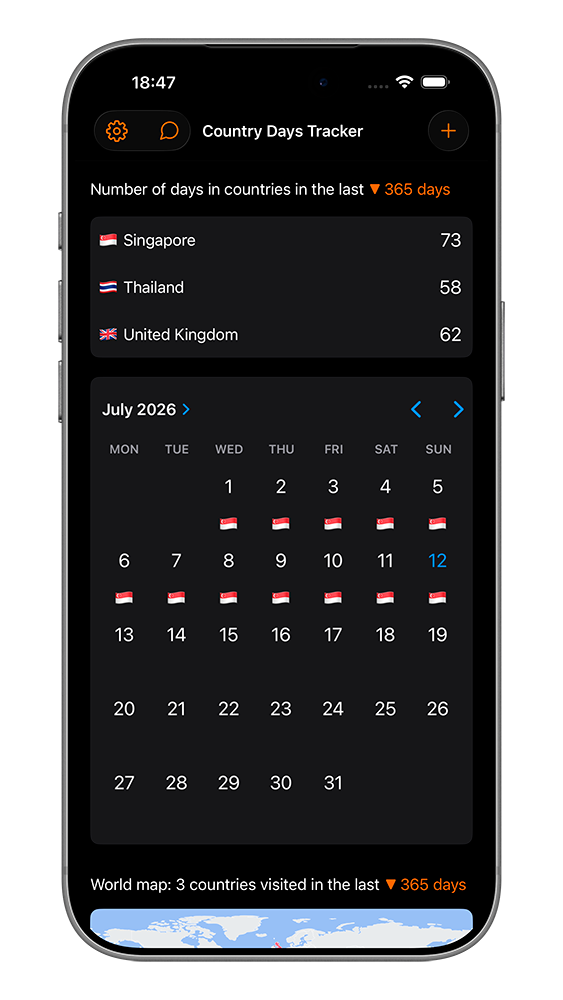
Instead of manually entering every trip, I can open the app and see a complete country-by-country timeline.
When I leave the UK, the app records the countries I visit. When I return, my UK presence continues automatically.
This gives me a clear travel history without relying only on passport stamps, booking emails, or memory.
Using Absence Rules for UK ILR
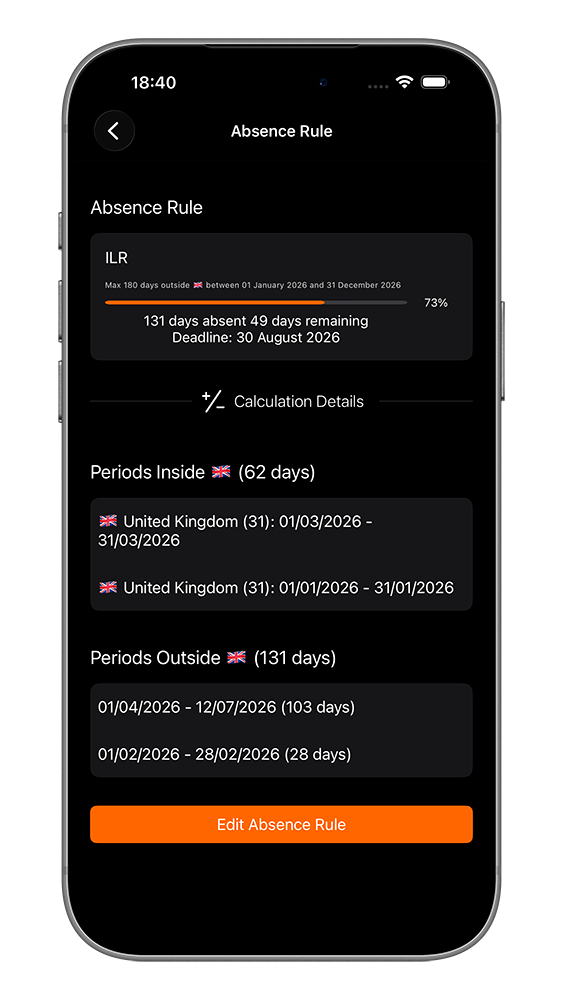
The feature I use for ILR planning is called Absence Rules.
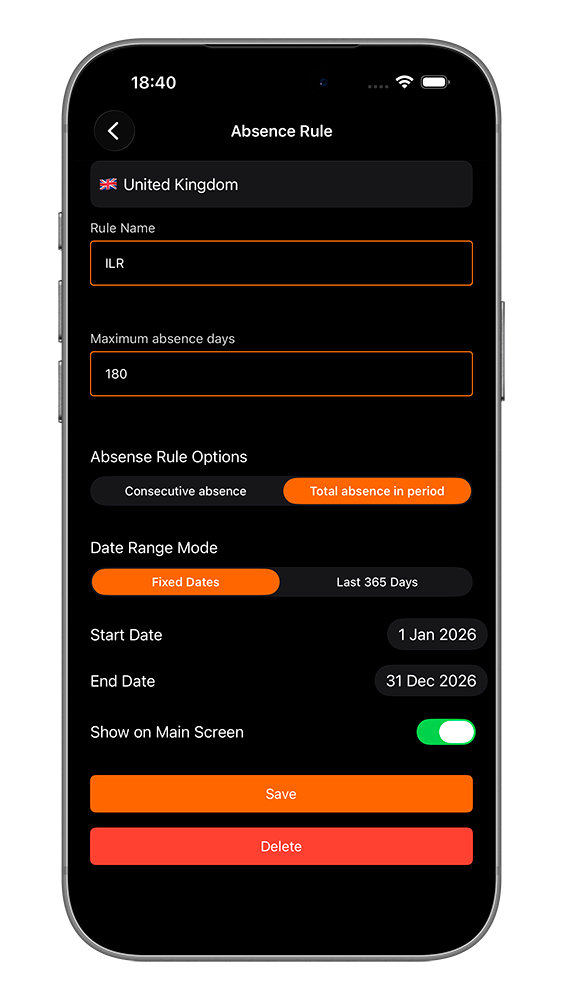
An Absence Rule counts the days I spend outside a selected country. In my case, I select the United Kingdom as my home country.
I can then configure the rule to match the period I want to monitor, such as:
- Total days spent outside the UK
- Absences during a specific qualifying period
- Absences within a rolling 12-month period
- Consecutive days outside the UK
- A custom maximum number of absence days
The app updates the result automatically as my travel history changes.
I can immediately see how many absence days have already been counted and how many remain under the limit I configured.
Why Automatic Tracking Is So Useful
The biggest advantage is that I do not need to remember to update anything after every trip.
If I spend a few days in France, two weeks in Spain, or several months in Thailand, the app adds those stays to my travel history automatically.
I do not have to open a spreadsheet when I return to the UK.
I also do not have to recalculate the entire qualifying period every time I want to check my current position.
The information is already there whenever I need it.
Checking My Absence Total from the Home Screen
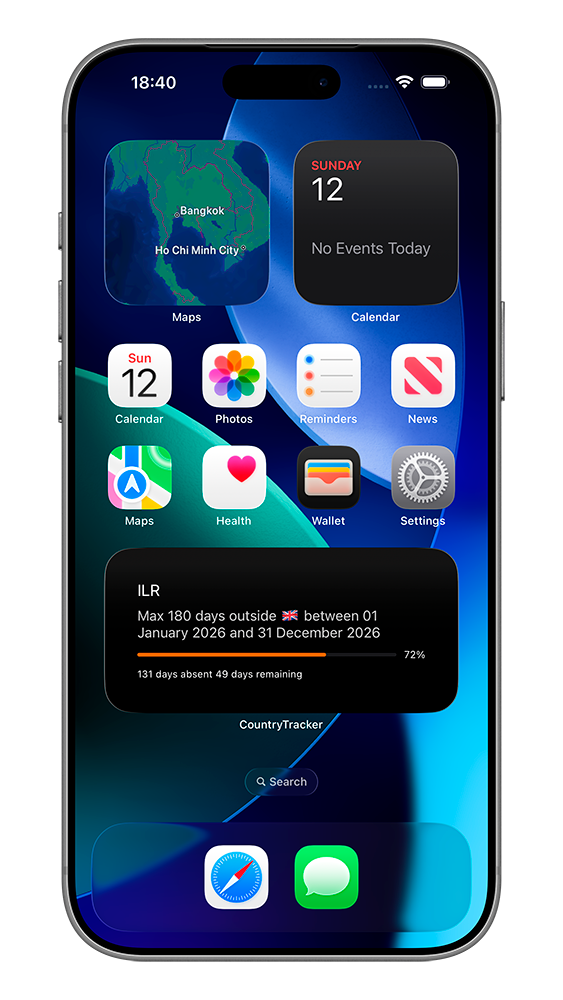
I also use the iPhone widget to keep my current numbers visible.
The widget lets me check my tracked days without searching through documents or opening a spreadsheet.
This is especially useful before planning another trip. I can quickly review my current absence total and make a more informed decision about future travel.
Restoring Previous Travel History
Automatic tracking works best after the app has been installed, but I also wanted to add trips that happened earlier.
Country Days Tracker includes several ways to restore previous travel history.
I can rebuild earlier visits using:
- Photos with date and location information
- Flight data imported from supported flight-tracking apps
- Manual entry for trips I already know
This helped me create a more complete record without entering every old trip from memory.
Keeping Supporting Documents with Each Trip
For important journeys, I can attach documents directly to the relevant dates in my travel history.
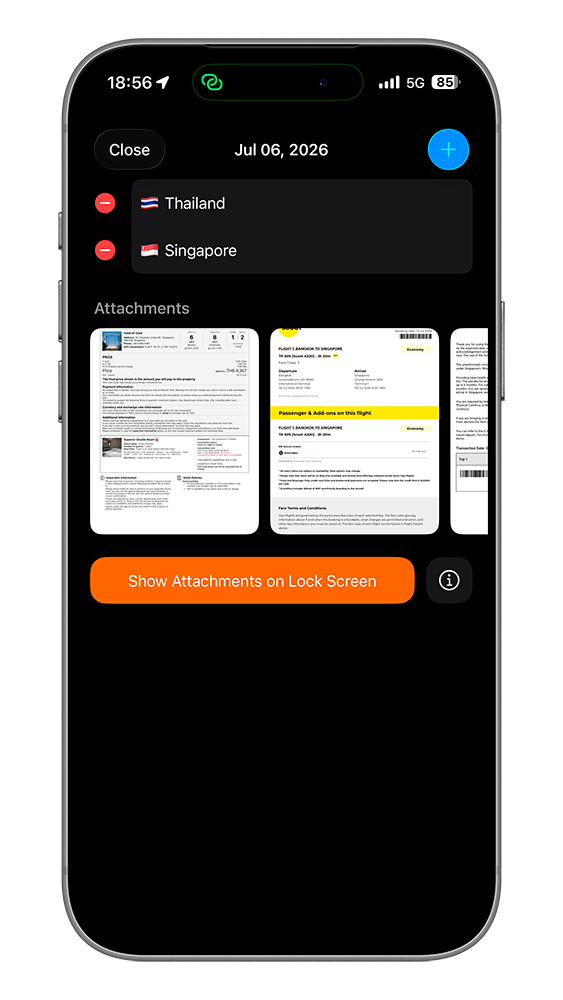
For example, I might attach:
- Boarding passes
- Flight confirmations
- Hotel reservations
- Passport or immigration documents
- Personal notes
- Photos showing the date and location
This keeps my travel timeline and supporting records together in one place.
If I need to review a trip months or years later, I do not have to search through multiple email accounts, photo libraries, and cloud folders.
Exporting My UK Absence History
Country Days Tracker can also generate a PDF report of my travel history.
The report can include:
- Countries visited
- Entry and departure dates
- Duration of each stay
- A chronological travel timeline
- Attached documents
- Supporting photos
This gives me a clear personal record that is much easier to review than a collection of separate spreadsheet rows and booking emails.
The report does not replace official immigration evidence or professional legal advice, but it helps me keep my own records organized and accessible.
Why I Prefer This Over an ILR Absence Spreadsheet
A spreadsheet only works when I remember to update it.
Country Days Tracker continues recording my travel history in the background, so the information does not depend entirely on my memory.
For me, the main benefits are:
- Automatic tracking of days inside and outside the UK
- No repeated manual calculations
- Custom absence rules and qualifying periods
- A complete country-by-country travel timeline
- Previous trips restored from photos and flights
- Supporting documents attached to specific dates
- Professional PDF exports
- No account, email address, or personal profile required
- Offline access to my records
Why This Matters
When a future immigration application depends on several years of travel history, trying to reconstruct everything at the last minute can be stressful.
Short trips are easy to forget. Booking emails can be deleted. Passport stamps may be incomplete or difficult to interpret.
Keeping an organized record as I travel is much easier than rebuilding it years later.
With Country Days Tracker, I can:
- Track my UK absences automatically
- Monitor a custom ILR qualifying period
- Check rolling absence totals
- Review every trip in a clear timeline
- Keep supporting documents with my travel records
- Export my history whenever I need it
If you are monitoring your travel history for UK ILR, continuous residence, or another residency requirement, Country Days Tracker can remove much of the repetitive work.
Instead of constantly counting days, I can let the app maintain the record and check it whenever I need it.
FAQ
How can I track my absences for UK ILR?
You can use Country Days Tracker to automatically record the countries you visit and count the days you spend outside the UK. Absence Rules allow you to monitor a specific qualifying period or a rolling date range.
Does Country Days Tracker calculate ILR absences automatically?
Yes. After location tracking is enabled, the app automatically records your country visits and updates your absence totals as you travel.
Can I track the ILR 180-day rule?
You can create a custom Absence Rule with a 180-day limit and select the date range or rolling period you want to monitor. Immigration rules can depend on your visa route and circumstances, so always verify the applicable requirements separately.
Can I track consecutive and total days outside the UK?
Yes. Absence Rules can be configured to monitor either consecutive days outside the UK or the total number of absence days during a selected period.
Can I restore trips from before I installed the app?
Yes. You can restore previous travel history from photos with location metadata, import supported flight records, or enter earlier trips manually.
Can I attach evidence to my ILR travel history?
Yes. You can attach boarding passes, flight confirmations, hotel reservations, photos, PDFs, and other documents directly to individual dates.
Can I export my ILR absence history?
Yes. Country Days Tracker can generate a PDF report containing your countries, travel dates, stay durations, timeline, and selected supporting attachments.
Does the app provide legal immigration advice?
No. Country Days Tracker is a personal travel-record and day-counting tool. It does not determine your legal eligibility for ILR and does not replace official Home Office guidance or advice from a qualified immigration professional.